
Long highway drives can be tiring, especially when you're pressed to maintain a constant speed. Thankfully, modern vehicles come equipped with cruise control, a feature that allows drivers to rest their feet while ensuring a smooth ride. This system is designed to enhance comfort and fuel efficiency, making road trips more enjoyable and less stressful.
Understanding Cruise Control Basics
Cruise control is essentially an electronic assistant for your car, designed to maintain a steady speed without requiring continuous pressure on the accelerator. It comes into play particularly during long stretches of highway driving, where maintaining speed can feel monotonous. For new drivers, the cruise control button is typically located on the steering wheel, a simple tool that can significantly change the driving experience.
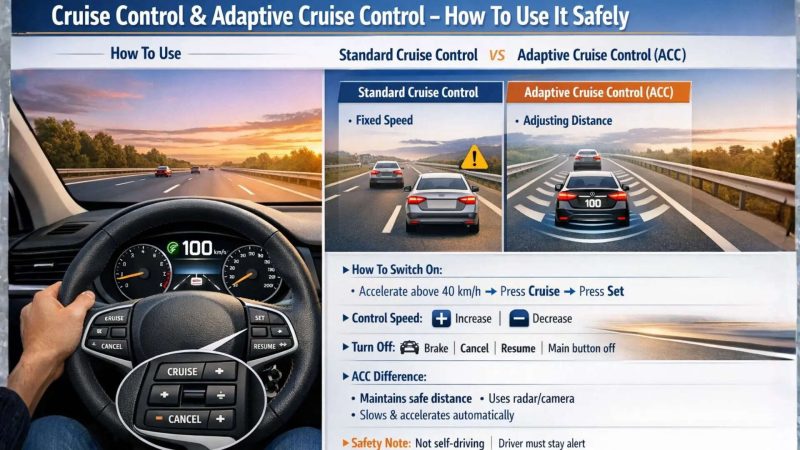
To activate cruise control, begin by accelerating your vehicle to a speed above 30-40 km/h, although it is most effective at highway speeds. Once you reach your desired velocity, press the "Cruise" or "On/Off" button on the steering wheel. This action usually triggers a small icon on the instrument cluster, resembling a speedometer, indicating that the system is operational.
After setting your speed by pressing the "Set" button, you can remove your foot from the accelerator. The vehicle will continue to maintain the speed you've selected, allowing you to focus on steering and monitoring the road ahead.
Adjusting Your Speed with Ease
Using cruise control isn't just about locking in a speed; it's about fine-tuning it as necessary. Drivers can adjust their speed easily while on the move. To increase speed, simply press the "+" or "Resume" button, allowing for gradual acceleration. Conversely, pressing the "-" or "Set" button will decrease your speed incrementally.
When you need to overtake another vehicle, simply press down on the accelerator. Once you lift your foot off, the car will revert to the previously set speed automatically, making overtaking both safe and convenient. This feature is particularly useful on open highways where traffic can be minimal.
Safety First: Deactivating Cruise Control
Safety remains paramount when using cruise control. Fortunately, the system is designed for quick disengagement. Tapping the brake pedal will immediately deactivate cruise control, ensuring that you can react swiftly in any situation. Alternatively, you can press the "Cancel" button to pause the system temporarily, allowing you to resume at the last speed by pressing "Resume" later.
If you wish to turn off cruise control completely, press the main Cruise button again. This safety feature is crucial, as it ensures full control of the vehicle is maintained at all times, particularly in changing driving conditions.
Exploring Adaptive Cruise Control
As automotive technology continues to evolve, many modern vehicles now come equipped with Adaptive Cruise Control (ACC), an advanced version of the traditional system. This feature not only maintains speed but also adjusts it according to the distance from the vehicle ahead. If your car includes Advanced Driver Assistance Systems (ADAS), you may find additional controls that let you set a safe following distance, often represented as gap levels on the instrument panel.
Adaptive Cruise Control enhances the driving experience by automatically slowing down or speeding up in response to traffic conditions, making highway driving even more relaxed. Understanding how to use both standard cruise control and ACC is essential for today's drivers, as it improves safety and convenience on the road.
In summary, cruise control can transform long-distance driving into a more comfortable experience, allowing drivers to focus on steering and navigation without the fatigue of constant speed regulation. Whether you're on a quiet stretch of highway or navigating through traffic, mastering this feature is a skill worth developing.